

Using Wizideo as an AI Task Manager: The To-Do List That Fills Itself
Every task manager on the market solves the same half of the problem. Todoist, Asana, Linear and the rest are excellent at organising work once it is written down — and that is precisely the step where teams fail. This page explains how Wizideo works as an AI task manager that starts one step earlier: at the moment somebody says “I’ll send that over on Friday” and nobody writes it anywhere.
The failure is capture, not organisation
Think about where your commitments actually get created. Almost none of them are born in a task app. They are born out loud, in a meeting, in a sentence somebody says while five other people are half-listening.
What happens next is the whole problem:
- The person who made the promise is talking, not typing
- The person who needs it assumes someone else noted it
- The transcript records it perfectly and nobody ever reads the transcript again
- A week later the commitment surfaces as a broken expectation, not as an overdue task
Adding a better to-do app does not touch any of that. The bottleneck is the gap between the spoken commitment and the tracked item, and it is a gap no amount of columns and labels can close.
A task manager can only manage what someone bothered to type. Most of what your team owes each other was never typed.
How Wizideo turns a meeting into a tracked board
Wizideo listens to the meeting and extracts the commitments as structured items: what was promised, who owns it, when it is due, and which meeting it came from. Those items land on an action board rather than in a document nobody opens.
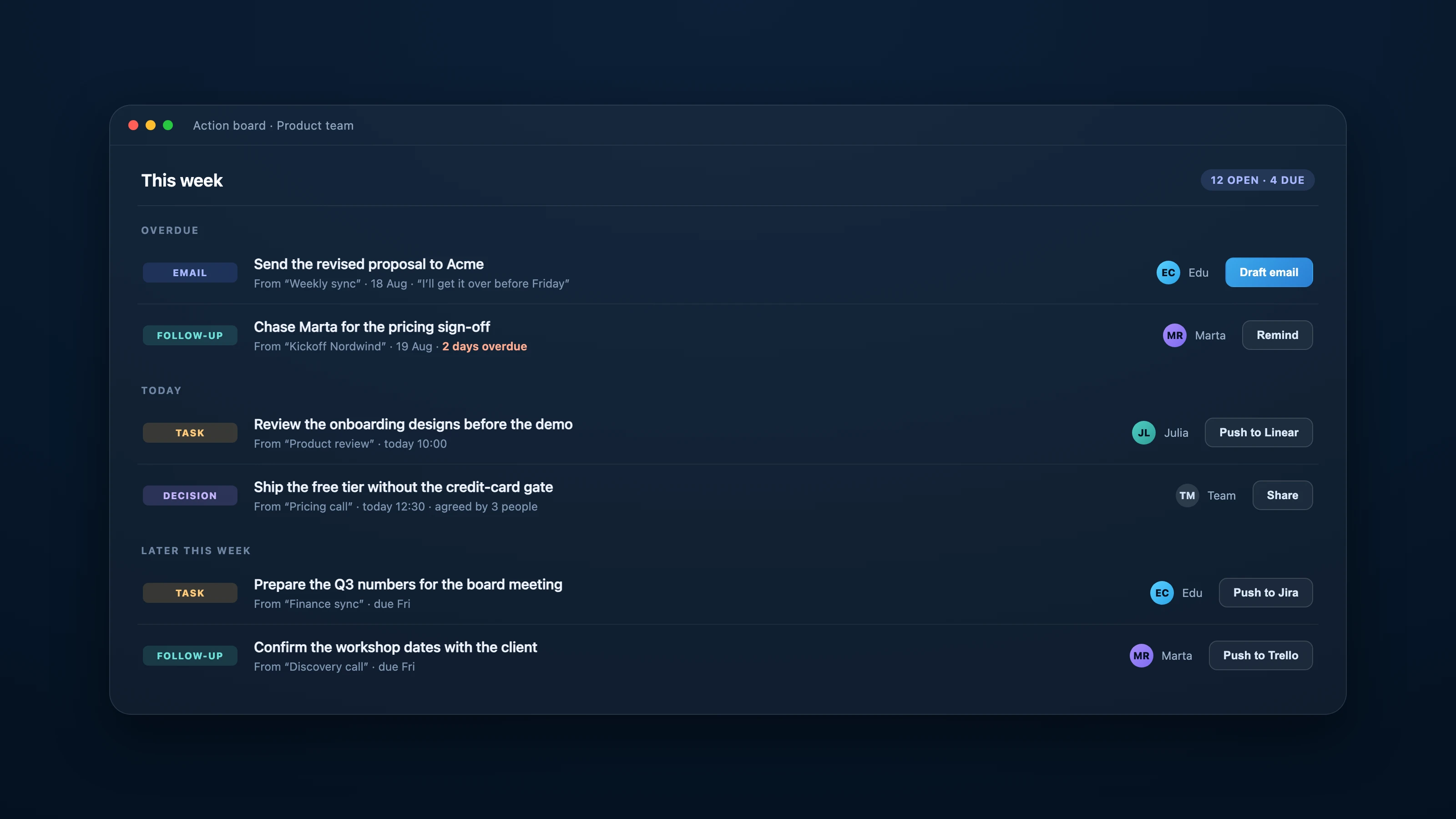
Three details in that screen matter more than they look:
- Every item carries its provenance. “From Weekly sync · 18 Aug · I’ll get it over before Friday”. You are never arguing about whether something was agreed, because the item points at the moment it was said.
- Items are grouped by urgency, not by project. Overdue first, today next. A board that opens on what is late is a board people actually act on.
- The next action is one click away. Draft the email, remind the owner, or push the item into the tool where the work happens.
What a board gives you that a to-do list does not
A to-do list is a flat set of strings. A board built from meetings carries context a manual list structurally cannot:
- Owner and counterpart, because the meeting knew who was talking to whom
- The source meeting, so any item can be traced back to the exact conversation
- The type of commitment — an email to send, a follow-up to chase, a task to do, a decision to record — which is what determines the right next action
- Automatic reminders and a daily digest, so nothing depends on someone remembering to check a tab
The last one is the quiet difference. Manual task managers are pull systems: they work when you open them. A board fed by meetings can push, and follow-through is a push problem.
Integrations: your board is not meant to be the last stop
The point is not to move your engineering team off Linear. Wizideo is where commitments are captured and chased; the execution tool stays wherever it already is.
- Push an item into Trello, Linear or Jira, with title, description and due date, without retyping it
- Slack for reminders and digests where the team already talks
- An MCP server, published in the official MCP Registry as
ai.wizideo/wizideo, so Claude, Cursor or any MCP client can read past meetings, search across them and create tasks directly - A REST API at
/v1/automation/tasksfor anything you want to automate yourself
That combination is what makes the “AI task manager” label honest rather than marketing: capture is automatic, tracking is centralised, and execution stays in the tools your team already chose.
When Wizideo is the wrong tool for this
Two cases, stated plainly.
If your work is not discussed in meetings — solo work, async-only teams, backlogs that arrive as tickets — then there is nothing for Wizideo to capture and a normal task manager is the better tool. And if you need sprint planning, story points, dependencies and burndown charts, Wizideo is not that; it feeds the tool that does it.
Conclusion
The reason follow-through fails is rarely that a team lacks a place to put tasks. It is that the commitments made out loud never became tasks at all, and a to-do app cannot fix a capture problem. Wizideo closes that gap by making the meeting itself the input to the board, then pushing the result into the tools where the work happens. Run it on your next team meeting and count how many of the items on the board you would have written down by hand.